Wednesday, 15 February 2017

Models and Model strore in Microsoft Dynamics AX


Model were introduced in Microsoft dynamics AX 2012 to help partner and customers more easily install and maintain multiple solutions side by side in the same layers.

Model Store, is a database in which all the application elements for Microsoft dynamics ax are stored.

Models, is a set of elements in a given layer. Each layer consists of one or more models. Each layer contains one system-generated model that is specific to that layer. Every element in a layer belongs to only one model. In other words, no element can belong to two models in the same layer, and every element must belong to a model.

A default model owned by Microsoft exists in each layer. Default models cannot be modified.

Models are stored in the model store. The model store is a database in which all application elements for Microsoft dynamics ax are stored. Customizations are also stored in the model store. The model store replaces the Application Object Data (AOD) files that were used in earlier versions of Microsoft dynamics ax. Models that have been installed in the model store are used at run time.

The following table describes the scenarios in which Microsoft recommend you use each installation method.

Scenario
Recommended installation method
Distributing a solution to customers
Model files
Deploying a solution in a development or test environment
Model files or XPO files
Deploying a solution to a production environment
Model store files

Wednesday, 18 January 2017

Cache Lookup Property of table in ax 2012

Cache Lookup - Ax 2012

Caches are used on both the client and the server. It increases the performance, the ax will get data from the cache instead of doing round trips and DB calls. So for each table, it's good to use cache lookup property. Microsoft Dynamics Ax runtime manages the cache by removing old records when new records are added to the cache.

Client Cache
A Client-side cache can be used only by the client. The client cache is used when a select statement is executed from the client tier. If no records are found in the client cache, the client then searches in the server cache for the records. If the record isn't located in the server cache, it will retrieve from the database. The maximum number of records can be maintained in a client cache is 100 records per table for the selected company.

Server Cache
A server-side cache can be used by any connection to the server. The server cache is used when a select is executed on the server tier. If no record found in the server cache, it will retrieve from the database. The maximum number of records maintained in a server cache is 2000 records for the selected company.

Types of Cache Lookup
  • None
  • EntireTable
  • Found
  • NotInTTS
  • FoundAndEmpty
None
No data is cached or retrieved from the cache for this table. This property value should be used for tables that are heavily updated or where it's unacceptable to read outdated data.

EntireTable
Creates a set-based cache on the server. The entire table is cached as soon as at least one record is selected from the table. An EntireTable cahce is flushed whenever an insert, update or delete is made to the table. So first select read all records from DB for the selected company and all the further selects will take data from the cache instead of DB calls.

Below is a list which shows to use the different type of cache lookup property as per table group.

Table GroupCache Lookup
Miscellaneous* See notes below
 Parameter EntireTable
 Group Found
 Main Found
 Transaction NotInTTS
 WorksheetHeader NotInTTS
 WorksheetLine NotInTTS
 Framework N/A
 Reference Found
 Worksheet NotInTTS
 TransactionHeader NotInTTS
 TransactionLine NotInTTS


Found
All successful caching key selects are cached. All caching key selects are returned from the cache if the record exists there. A select forUpdate in a transaction forces reading from the database and replaces the record in the cache.
This is typically used for static (lookup) tables, such as Unit, where the record usually exists.

NotInTTS
All successful caching key selects are cached.
When in a transaction (after ttsBegin), no caches made outside the transaction are used. When inside a transaction, the record is read once from the database and subsequently from the cache. The record is select-locked when reading in a transaction, which ensures that the record cached is not updated while the transaction is active.
A typical example of the NotInTTS property is on the CustTable in the Microsoft Dynamics AX application. It is acceptable to read outdated data from the cache outside a transaction, but when data is used for validation or creating references, it is ensured that the data is real-time.

FoundAndEmpty 
All selects on caching keys are cached, including selects that are not returning data.
All caching key selects are returned from caching if the record exists there, or the record is marked as nonexistent in the cache. A select forUpdate in a transaction forces reading from the database and replaces the record in the cache.
An example of FoundAndEmpty record caching is in the Discount table in the Microsoft Dynamics AX standard application. By default, the Discount table has no records. By using a FoundAndEmpty cache on this table, the keys that are queried for but not found are stored in the cache. Subsequent queries for these same non-existent records can be answered from the cache without a round trip to the database. 

Friday, 15 July 2016

Create MorphX Report in Ax

We're already aware of MorphX environment of Microsoft Dynamics Ax. The MorphX reports are very easy to delevelop than SSRS reports. SSRS reports are developed in visula studio while MorphX report are developed inside Microsoft Dynamics Ax (MorphX Environment) that's why these reports are named as MorphX reports or sometimes Ax Reports.

Here I would tell you step by step development of a demo MorphX report.
This example is to pick all the sales order records related to one customer. If you want to print all customer's records than don't select any parameter.
  • First of all create a new report and add it to your project.

  • Add CustTable to Report datasource
  • Now expend CustTable datasource and add SalesTable to inside CustTable datasource.
  • In salesTable datasource create a relation as shown below that will only pick those records where customer account in CustTable is equal to customer account in SalesTable. 
                                      
  • Right click on Report Design and select Generate Design. By this CustTable and SalesTable section would be automatically created in your report's design. 

  • Inside 'Section Group : CustTable', right click on 'Body: CustTable_body', select new control 'Field form CustTable' and add AccountNum and Name fields to body.

  • Similarly. add SaleTable Fields whichever you want to Body:SalesTable_body. I have added Salesid, QuotationId, CreatedDateTime, SalesSatatus. deliveryAddress and CurrencyCode.

  • Now open your report and select any customer

  • After following all the above steps successfully your report output would be as shown below.


Note: I didn't focus on report's design much so this report looks very simple. You can customize this report according to your requirement, you can also make changes for individual control's properties such as size, caption, width-height, margins, position, label etc. After changing control properties you can make your report more attractive.
If you want to use table's display methods in your report than write that display method name in data method property.

In case you have any doubt do comment below. Thank you so much. 


Thursday, 19 May 2016

Create New Table On New Record Creation Of Another Table

This post will help you if you have requirement to create a new record every time when a new record is created in another table.

Let me explain this with an example:
Assume that you have a master table 'Bank_Account' which contains a field 'AccountNumber'. Now the requirement is  when a new Account Number is added (created) related to this Account Number a new table should be created as 'Transaction_####'. The name of the Transaction_#### would be dynamic.
If the Account Number is 1001 then Transaction_#### name should be Transaction_1001.

Follow the below steps:

  • Create a table Bank_Account
    • Add a field Account_Number (String)
    • Set properties Mandatory : Yes , Allow Edit : No
    • Make Account_Number as a Primary Key 
      • PK : Go to Index node > New Index

    • Field AccountNumber has now become primary key.

  • Override modified field method in table Bank_Account and write following code.
 public void modifiedField(FieldId _fieldId)
{
    SysDictTable sysdictTable;
    Treenode treenode;// its a class
    AOTTableFieldList fieldnode;
    str Prefix,Acc,Tablename,prop;
    int pos,Account_NumberID;
    #AOT
    #Properties
    ;

    Account_NumberID = fieldNum(Bank_Account, Account_Number); // Getting Account_Number field ID
    super(Account_NumberID);
    this.insert();
    Prefix = "Transaction_";
    Acc = this.Account_Number;
    TableName= Prefix + Acc;

//#Table path refer the \\Data Dictionary\\Tables and finding the path
treenode = treenode::findNode(#TablesPath);
//AOTadd method is to add table in tables//TableName is table name
treenode.AOTadd(Tablename);
treenode = treenode.AOTfindChild(TableName);
treenode.AOTcompile(1);
treenode.AOTsave();
treenode.AOTfindChild(TableName);
fieldnode = treenode.AOTfirstChild();
fieldnode.addString('AccountNum');
fieldnode = fieldnode.AOTfindChild('AccountNum');
prop = fieldnode.AOTgetProperties();
pos = findPropertyPos(prop,#PropertyExtendeddatatype); //find right place to put extended data type
pos = strFind(prop,'ARRAY',pos,strLen(prop));
pos = strFind(prop,'#',pos,strLen(prop));
fieldnode.AOTsetProperties(prop);
treenode.AOTcompile(1);
treenode.AOTsave();
treenode.AOTRestore(); //to load assigned extended data type properties
sysdictTable = sysdictTable::newTreeNode(treenode);
appl.dbSynchronize(sysdictTable.id());

}


  • Override insert method of table Bank_Account and write following code

public void insert()
{
    super();
    info("NewTable " + "Transaction_" + this.Account_Number + " has been created");
}

  • An Account is added into Bank_Account


  • Now go to AOT > Table node , a new table named 'Transaction_101' has been created.


                     ThanYou !

Create Table Using X++ Code

static void autoTable(Args _args)
{
SysDictTable sysdictTable;
Treenode treenode;
AOTTableFieldList fieldnode;
str prop;
int pos;
#AOT
#Properties
;
//Coded by Gautam Verma

//#Table path refer the \\Data Dictionary\\Tables and finding the path
treenode = treenode::findNode(#TablesPath);
 
//AOTadd method is to add table in tables//AutoTableis table name
 
treenode.AOTadd('AutoTable');
treenode = treenode.AOTfindChild('AutoTable');
treenode.AOTcompile(1);
treenode.AOTsave();
treenode.AOTfindChild('AutoTable');
fieldnode = treenode.AOTfirstChild();
fieldnode.addString('AccountNum');
fieldnode = fieldnode.AOTfindChild('AccountNum');
prop = fieldnode.AOTgetProperties();
pos = findPropertyPos(prop,#PropertyExtendeddatatype); //find right place to put extended data type
pos = strFind(prop,'ARRAY',pos,strLen(prop));
pos = strFind(prop,'#',pos,strLen(prop));

fieldnode.AOTsetProperties(prop);
treenode.AOTcompile(1);
treenode.AOTsave();
treenode.AOTRestore(); //to load assigned extended data type properties
sysdictTable = sysdictTable::newTreeNode(treenode);
appl.dbSynchronize(sysdictTable.id());
}

                     ThanYou !


Tuesday, 17 May 2016

Joins In Microsoft Dynamics Ax

There are basically four types of joins in Ax,
  1.  Inner Join
  2. Outer Join 
  3. Exists Join
  4. Notexists Join
Inner Join : Inner Join will return records from both Outer table and Inner table, only the records which are available in Inner table. Inner Join will also return duplicate records.

Outer Join : Outer Join will return all the records from both Outer table and Inner table. Outer Join will also return duplicate records.

Exists Join : Exists Join will return records only from Outer table which are available in Inner Table. It will not return any duplicate records. 

NotExists Join : NotExists Join will return records only from Outer table which are not available in Inner Table. It will not return any duplicate records.

So now you are clear with the definitions of multiple types of joins in ax. To understand how practically it works use the following steps.

  • First of all create two tables in Dynamics Ax Demo_Outer and Demo_Inner.
  • In Demo_Outer table create two fields
    • Account (PK)
    • Name
  • In Demo_Inner table create two fields
    • Account (FK)
    • Phone
  • Insert some records in both the tables


To test the joins create a job and fetch records from tables by using code.

Inner Join : Write the following code to test inner join.

static void Demo_Joins(Args _args)
{
    Demo_Outer demo_Outer;
    Demo_Inner demo_Inner;
    while select demo_Outer
          join demo_Inner
        where demo_Inner.Account == demo_Outer.Account
        {
            info(demo_Outer.Account +" :: "+ demo_Outer.Name +" :: "+ demo_Inner.Phone );
        }

}

Inner Join Output :
Inner Join


Outer Join : Write the following code to test outer join.

static void Demo_Joins(Args _args)
{
    Demo_Outer demo_Outer;
    Demo_Inner demo_Inner;
    while select demo_Outer
       outer join demo_Inner
        where demo_Inner.Account == demo_Outer.Account
        {
            info(demo_Outer.Account +" :: "+ demo_Outer.Name +" :: "+ demo_Inner.Phone );
        }
}

Outer Join Output : 
Outer Join


Exists Join :  Write the following code to test exists join.

static void Demo_Joins(Args _args)
{
    Demo_Outer demo_Outer;
    Demo_Inner demo_Inner;
    while select demo_Outer
       exists join demo_Inner
        where demo_Inner.Account == demo_Outer.Account
        {
            info(demo_Outer.Account +" :: "+ demo_Outer.Name +" :: "+ demo_Inner.Phone );
        }
}

Exists Join Output : 


Exists Join


NotExists Join : Write the following code to test notexists join.

static void Demo_Joins(Args _args)
{
    Demo_Outer demo_Outer;
    Demo_Inner demo_Inner;
    while select demo_Outer
       notexists join demo_Inner
        where demo_Inner.Account == demo_Outer.Account
        {
            info(demo_Outer.Account +" :: "+ demo_Outer.Name +" :: "+ demo_Inner.Phone );
        }

}

NotExists Join Output : 
NotExists Join


                  Thank You !


Monday, 18 April 2016

How to use Display Method in AX

Sometimes developer has requirement to show data on selecting some record. This can be achieved using display method. It saves memory space as we don't need to insert record in another tables to use data. Here I'm giving an simple example on how to use display method in axapta.

Example:

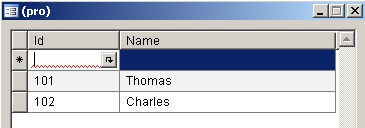
  • Crate two tables TableA and TableB
  • Create two fields in TableA Id and Name.
  • Create a field in TableB Id.
  • Now create a relation as shown below.


  • Create a display method getNameMethod and write following code.


  • Now create a Form to test display method
  • Add TableB in Data Source of form
  • Drag Id field to design and create new string field Name and change property.
  • Make DataSource as TableB and DataMethod as getNameMethod.

  • Insert some dummy records in Table.


  • Now open form and select any record.


  • Here name is coming automatically using display method.


  • Similarly, you can also try with some standard table.
Note : In example Axapta 4.0 version (2006) is used.